Palau ID Video Verification 2026: Awaiting Video Call
Palau ID video verification can hold an application and disable a renewal. We mapped the four panel stages, the booking rules, and what to send support.
We may earn a commission if you apply through this link. This site is independent and is not the official RNS.ID or Palau government site.
Key takeaways
- Palau ID video verification is a live call with a human verifier, and only some applications get one. RNS's documentation says "some applications require a video verification call before identity activation or card production can continue" — it is conditional, not a universal step, and nothing on the application page tells you in advance whether yours will need it.
- The hold has its own status name: Awaiting Video Call. It is one of the ten statuses RNS documents, and it can appear after Approved as well as before, because approval moves the record to production and the call can sit between those two points.
- While the call is outstanding, RNS "may temporarily disable another Palau ID purchase or renewal." That is the sentence most people hit sideways: the renewal button is missing, so they assume a bug and buy a second ID. RNS's troubleshooting page answers that directly — "do not buy another ID or create another account to bypass a pending review".
- The dashboard lags the booking by up to 30 minutes. RNS says so in a note on the video-verification page, and it is the single cheapest cause of a double booking.
- No verifier will ever need a secret. RNS's own warning: "Never share your RNS.ID password, authenticator code, wallet recovery phrase, or private key during a video call. Identity verification does not require those secrets."
On this page
- Palau ID video verification, and the hold it puts on your application
- The four stages the verification panel can show
- Awaiting Video Call is one rung on a ten-status ladder
- Booking the call: six steps, and the two that cause repeat bookings
- What to have in the room before you join
- The rule that matters more than the call itself
- Why a live human check exists at all
- It can disable your next purchase or renewal, and that is deliberate
- When it is stuck: what support actually needs
- Related reading
- FAQ
Palau ID video verification, and the hold it puts on your application
You paid, you uploaded a document, you did the selfie — and the dashboard now says Awaiting Video Call, with no explanation of why yours was picked and no estimate of how long it adds. The stakes are not abstract: an application parked at this status is one RNS can leave stationary while it also, by its own documentation, blocks you from buying or renewing another Palau ID, so a single unbooked call can freeze both your pending order and an ID that is expiring. We read RNS's video-verification, identity-verification, application-status and troubleshooting pages side by side on 1 November 2026 and reconciled them into one sequence, because no single page on RNS's site contains the whole flow. RNS is not improvising this: Palau's own Digital Residency Office confirms RNS.ID as the authorized service provider for the programme, and the functions it lists as authorized include "the implementation of applicable security measures pursuant to Digital Residency Office regulations".
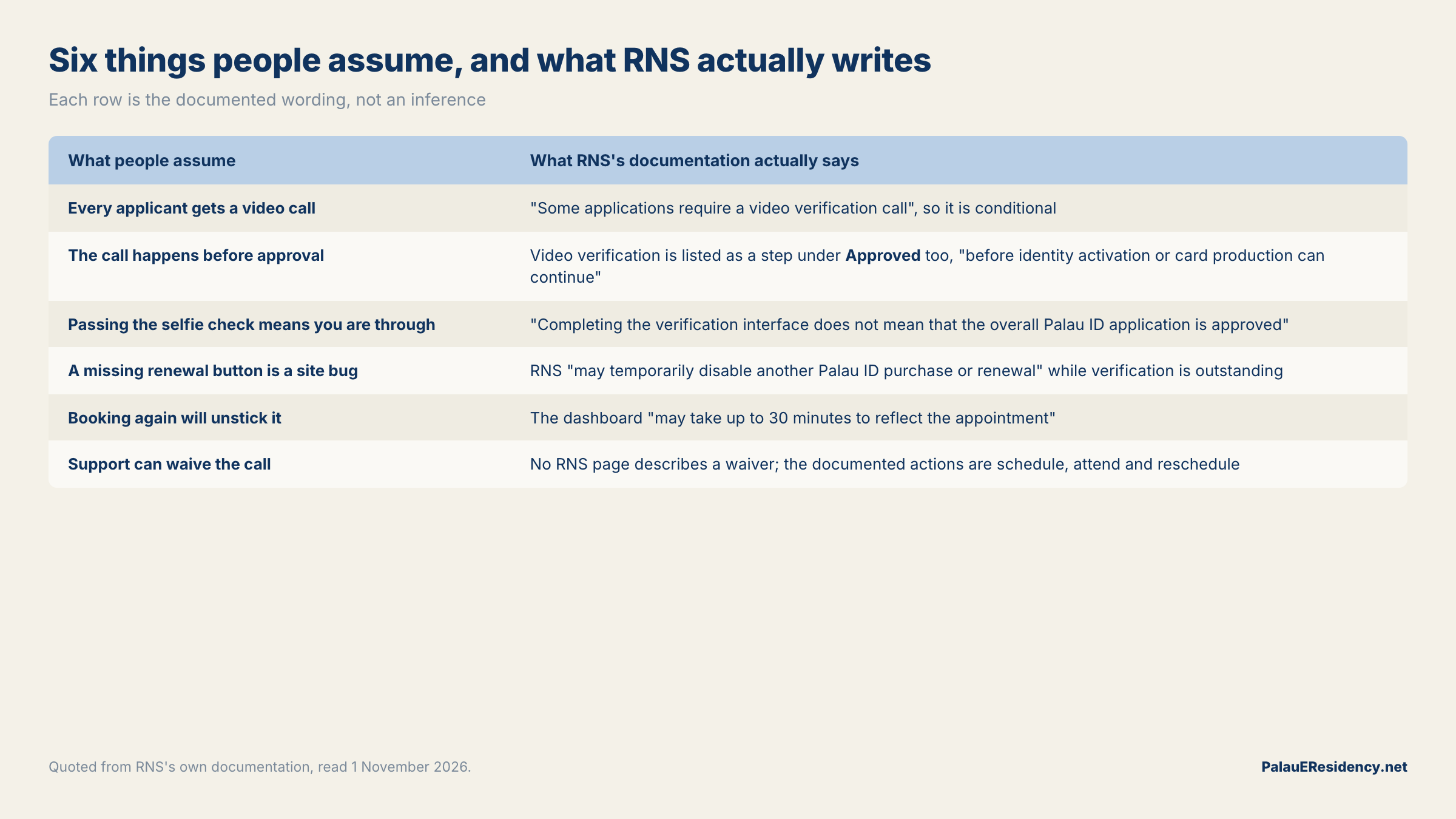
The short version: Palau ID video verification is a scheduled call that sits between the automated identity check and card production, it fires on some applications and not others, and almost every avoidable problem with it is a scheduling problem rather than a verification problem.
| What people assume | What RNS's documentation actually says |
|---|---|
| Every applicant gets a video call | "Some applications require a video verification call" — it is conditional |
| The call happens before approval | Video verification is listed as a step under Approved too, "before identity activation or card production can continue" |
| Passing the selfie check means you are through | "Completing the verification interface does not mean that the overall Palau ID application is approved" |
| A missing renewal button is a site bug | RNS "may temporarily disable another Palau ID purchase or renewal" while verification is outstanding |
| Booking again will unstick it | The dashboard "may take up to 30 minutes to reflect the appointment" |
| Support can waive the call | No RNS page describes a waiver; the documented actions are schedule, attend, and reschedule |
Read the last two rows as the practical content of this page. For the step that comes before it — the document-and-selfie flow almost everyone completes unattended — our documents checklist is the companion piece.
The four stages the verification panel can show
RNS does not expose a percentage or an ETA. It exposes a panel with four possible states, and knowing which one you are looking at tells you whether the next move is yours or theirs.
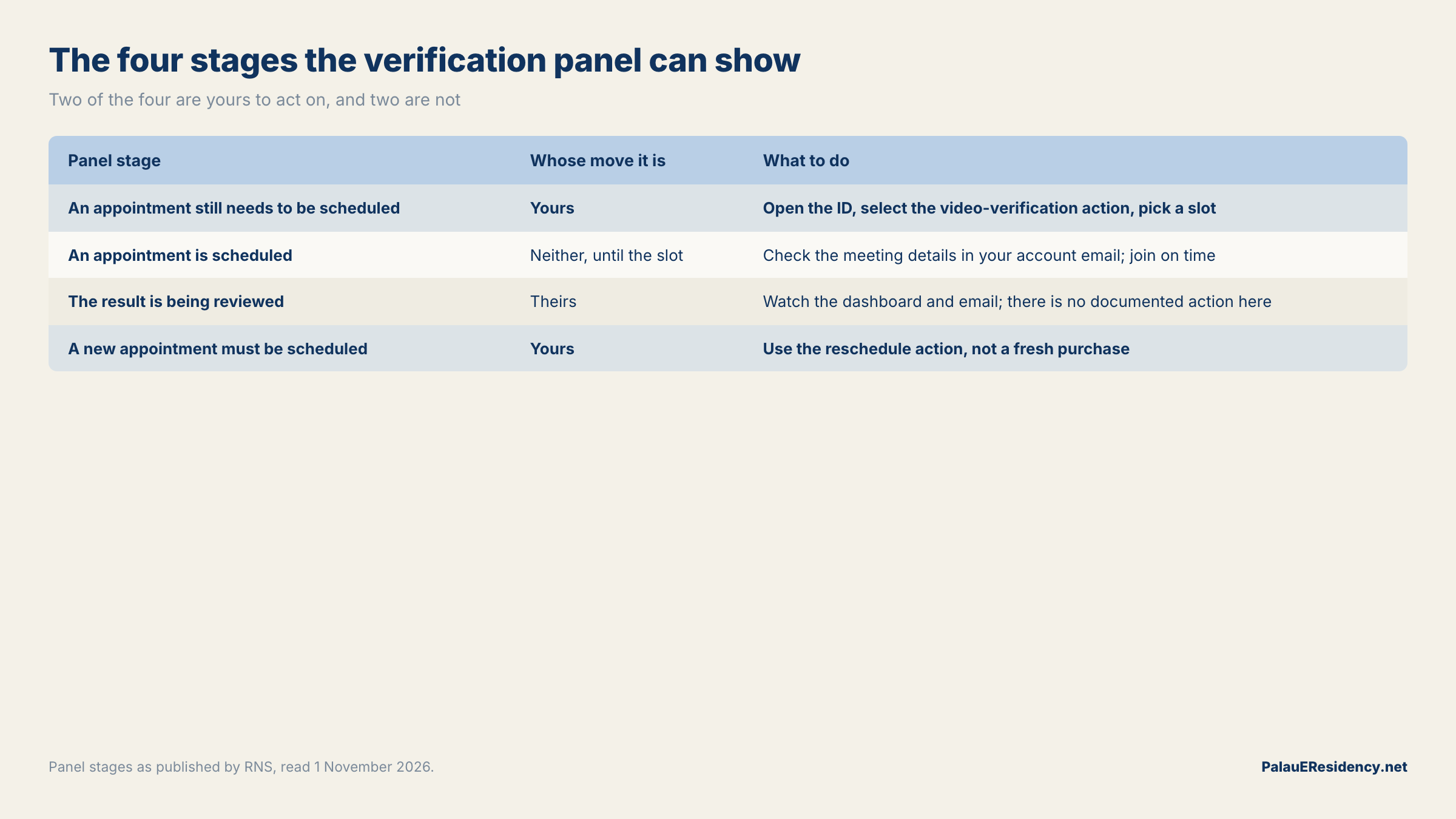
| Panel stage | Whose move it is | What to do |
|---|---|---|
| An appointment still needs to be scheduled | Yours | Open the ID, select the video-verification action, pick a slot |
| An appointment is scheduled | Neither, until the slot | Check the meeting details in your account email; join on time |
| The result is being reviewed | Theirs | Watch the dashboard and email; there is no documented action here |
| A new appointment must be scheduled | Yours | Use the reschedule action, not a fresh purchase |
Two of those four are waiting states, and one of them — "the result is being reviewed" — is the stage people most often mistake for a failure. RNS is explicit that a completed call does not produce an instant verdict: "after a completed call, the result may remain under review." There is no published review time for that window, which is consistent with RNS's general position on timelines, that review times vary by application and stage.
The practical read: of the four stages, you can only act on two. Confirming which one is showing, before contacting support or paying for anything, is the whole diagnostic.
Awaiting Video Call is one rung on a ten-status ladder
RNS documents ten application statuses, and the reason this matters is that Awaiting Video Call is not where applications go to die — it is a specific, actionable rung with a documented exit. Here is the full ladder as RNS's status page sets it out, with the action each one asks of you.
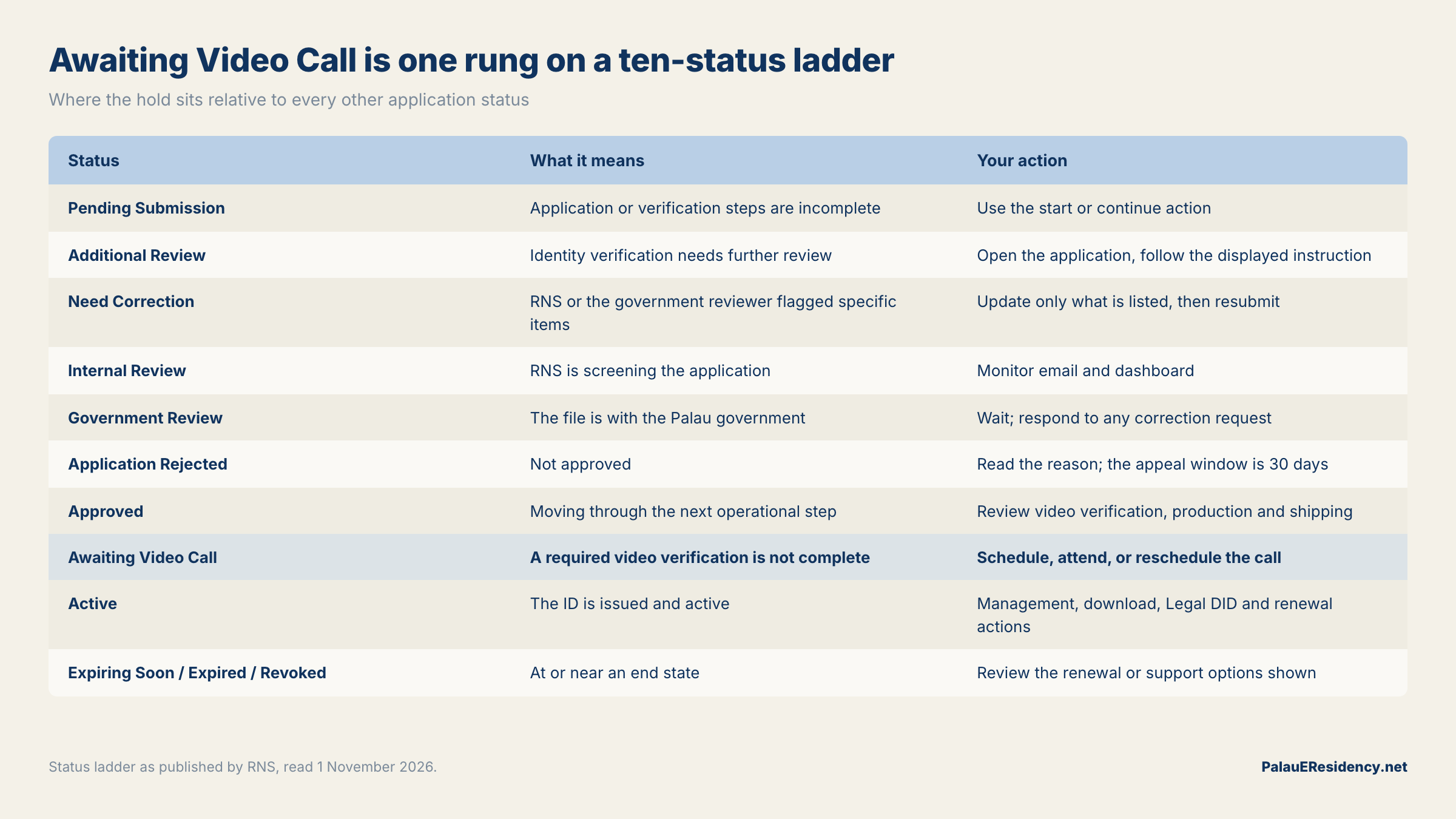
| Status | What it means | Your action |
|---|---|---|
| Pending Submission | Application or verification steps are incomplete | Use the start or continue action |
| Additional Review | Identity verification needs further review | Open the application, follow the displayed instruction |
| Need Correction | RNS or the government reviewer flagged specific items | Update only what is listed, then resubmit |
| Internal Review | RNS is screening the application | Monitor email and dashboard; no resubmission unless asked |
| Government Review | The file is with the Palau government | Wait; respond to any correction request |
| Application Rejected | Not approved | Read the reason; the appeal window is 30 days |
| Approved | Approved and moving through the next operational step | Review video verification, production and shipping information |
| Awaiting Video Call | A required video verification is not complete | Schedule, attend, or reschedule the call |
| Active | The ID is issued and active | Use management, download, Legal DID and renewal actions |
| Expiring Soon / Expired / Revoked | At or near an end state | Review the renewal or support options shown |
Notice where Approved sits. Its documented action is to "review video verification, production, and shipping information", and RNS's status page says statuses "can advance after verification, internal review, government review, card production, and video verification". So a call can appear on a file that has already cleared review — approval is not a guarantee that no call is coming.
If your status is one of the two rejection-adjacent rungs instead, the route is different: see what to do when a Palau ID application is rejected, and note RNS's own caution that "a correction request is not the same as a final rejection".
Booking the call: six steps, and the two that cause repeat bookings
RNS gives six steps. Four are obvious and two are where people lose a day.
- Open the affected Palau ID from your dashboard.
- Select the video-verification action.
- Choose an available appointment and confirm it.
- Use the exact email address registered to your RNS.ID account when booking.
- Check that email address for the meeting details.
- Return to the dashboard and confirm the appointment shows as scheduled.
Step 4 is the one that quietly breaks. The scheduling form will accept a different address, and the meeting details then land somewhere RNS cannot tie back to your application — so if you keep a separate address for support mail, or you applied using an Apple private-relay alias, use the registered one here and read the mail at its destination.
Step 6 is the other. RNS's note is unambiguous: "the dashboard may take up to 30 minutes to reflect the appointment. Allow time for the status to update before booking another appointment." A panel that still says an appointment needs scheduling, twenty minutes after you booked one, is not evidence that the booking failed. Before you touch anything in this flow, the application preflight checklist is the faster way to confirm your document and photo will survive a second look.
What to have in the room before you join
The call is a document-and-face check conducted live, so the preparation is the same as the automated step — with the difference that a human is watching and can ask.
| Bring | Why RNS asks for it |
|---|---|
| The original identity document from your application | The call checks the physical document; copies, screenshots and scans are excluded at the automated stage for the same reason |
| A device with a working camera and microphone | The automated check needs a camera only; the call needs both |
| A quiet, well-lit location and a reliable connection | RNS names all three explicitly |
| A clear view of your face and the document | "Make sure your face and document can be shown clearly" |
| Punctuality | "Join at the scheduled time and follow the verifier's instructions" |
One rule carries over from the automated flow and is worth stating plainly, because it is the fastest way to lose an application rather than an appointment: nobody may sit the check for you. RNS's warning on identity verification is that you must not let another person complete the facial check and must not digitally alter the document or selfie, and that either can cause rejection or additional review. A live verifier is substantially better placed to notice both than a liveness algorithm is.
If the document itself is the weak link — a card near expiry, a damaged edge, a name that no longer matches — fix that before the call, not during it. Our note on which revision of the Palau ID card you are holding covers what the current card prints and where.
The rule that matters more than the call itself
An appointment is an invitation to a video call from a company that holds your identity documents, scheduled by email. That is also the exact shape of the most effective impersonation scam in this programme, which is why RNS writes the rule in a warning box rather than a paragraph:
Never share your RNS.ID password, authenticator code, wallet recovery phrase, or private key during a video call. Identity verification does not require those secrets.
Read "authenticator code" and "wallet recovery phrase" as the tells. A genuine verifier is confirming that a face matches a document; it has no use for a one-time code, and none at all for a seed phrase, which exists only to move crypto. RNS keeps a security and scam reporting page for exactly this, and its support guidance adds a second habit worth copying: submit identity evidence "only through a verified, approved secure channel when requested, not as an ordinary email or chat attachment".
Two practical consequences. First, if a "verifier" asks for any of those four things, the call is not the problem — the invitation was. Second, book from the dashboard rather than from a link in a message, because that is the one route whose provenance you can check. The wider pattern-matching for this programme sits in the risks page.
Why a live human check exists at all
A video call is expensive to run and annoying to attend, so it is reasonable to ask why a programme that already runs an automated document-and-liveness flow adds one. The automated half is no secret — Sumsub publishes a customer story on onboarding users for the Digital Residency Program of Palau. RNS has not published a trigger list for the call. What it has published, and what the trade press reported, is a counterfeiting problem.
On 24 October 2025, RNS announced measures against what it described as the misuse of fake Palau IDs to bypass KYC checks. As reported by KuCoin's news desk citing MetaEra, the package had three parts:
| Measure announced 24 Oct 2025 | What it does |
|---|---|
| A secondary verification process | A second check behind the first, rather than a stricter single check |
| An official API for third parties | Lets a platform verify a document number, issue date, photo and date of birth against RNS records |
| A fraud blacklist | Confirmed fake or impersonated users are banned and their details added to a shared fraud database |
A live call is the most straightforward form a "secondary verification process" can take, and the timing fits — but RNS has not stated that the video call is that measure, and we are not asserting a link it has not made. What is documented is narrower and enough to act on: the call exists, it is conditional, and it sits where a second look at a document would sit. For the other half of the picture — which vendors can read a Palau ID at all — see Palau ID verification and the KYC vendor libraries.
It can disable your next purchase or renewal, and that is deliberate
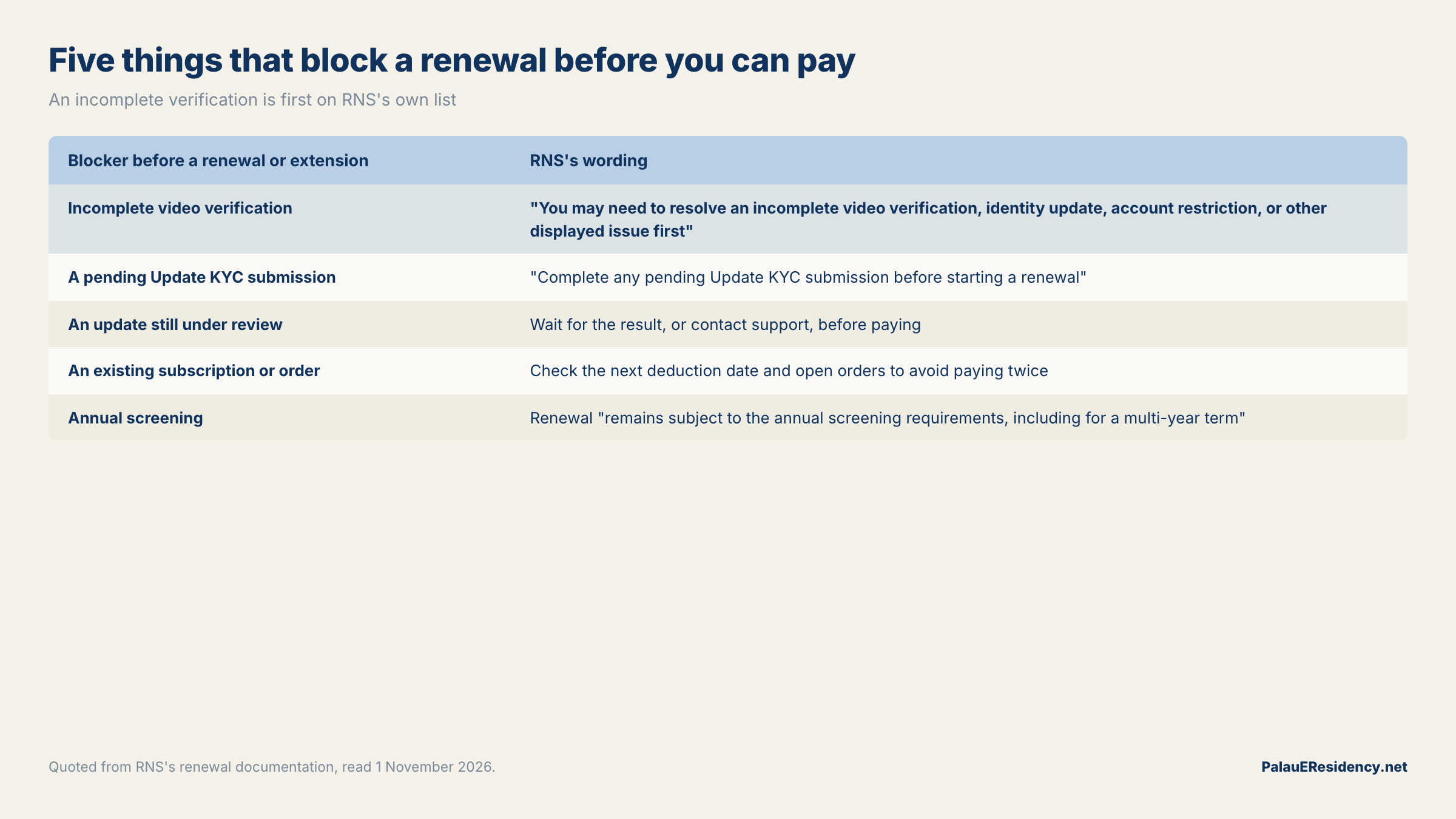
This is the part that costs money, so it gets its own section. RNS's video-verification page says that while verification is outstanding, it "may temporarily disable another Palau ID purchase or renewal", and its renewal page lists an incomplete video verification first among the things to clear before renewing.
| Blocker before a renewal or extension | RNS's wording |
|---|---|
| Incomplete video verification | "You may need to resolve an incomplete video verification, identity update, account restriction, or other displayed issue first" |
| A pending Update KYC submission | "Complete any pending Update KYC submission before starting a renewal" |
| An update still under review | Wait for the result, or contact support, before paying |
| An existing subscription or order | Check the next deduction date and open orders to avoid paying twice |
| Annual screening | Renewal "remains subject to the annual screening requirements, including for a multi-year term" |
The failure mode is predictable. The renewal action is missing, the ID is close to expiry, and buying a fresh one looks like the pragmatic fix. RNS's troubleshooting page closes that door in one line: "do not buy another ID or create another account to bypass a pending review." Its status page says the same thing about corrections — do not create a new account or purchase another ID unless support instructs you to.
So the order of operations is: clear the call, then renew. If your ID is genuinely close to expiring while a call is outstanding, that is a support conversation, not a checkout. Renewal and reprint covers the normal path once the hold is gone.
When it is stuck: what support actually needs
RNS names three conditions that justify escalating rather than waiting: no action appears in the panel, the meeting link does not work, or the status does not update after the review. In those cases it asks for two specific things — your application ID and the appointment time.
| Send | Do not send |
|---|---|
| The application ID | A password, authenticator code, seed phrase or private key |
| The appointment date and time | Identity documents as ordinary email or chat attachments |
| The account email you booked with | A second application or a new account |
| A screenshot with document numbers redacted | Edited screenshots or altered documents |
| The exact error text, if any | An estimate of how long you think it should have taken |
Two notes on expectations. RNS publishes no service level for the review window and tells applicants to check the dashboard and email rather than rely on an estimate from an older document. And if the email and the dashboard disagree, its instruction is to keep both records and ask support which action is required — while warning that a conflicting display does not extend a deadline, including the 30-day appeal window on a rejection.
None of this guarantees an outcome. Approval, timing and acceptance are decisions RNS, the Palau government and any third-party platform make on their own terms, and this page describes a documented process rather than a result. Support and status is the companion page for a file that has stopped moving.
Related reading
- How to apply for Palau digital residency — the whole application, start to card
- Palau digital residency documents checklist — what the automated step before the call expects
- Palau ID photo rejected — the single most common correction
- Palau digital residency application rejected — reasons, corrections and the 30-day appeal
- RNS.ID application status and support — escalation routes for a stalled file
- Palau digital residency renewal and reprint — the path a video-call hold blocks
- Is RNS.ID legit? — who runs the programme, and under what authority
FAQ
Does every Palau ID application need a video verification call?
No. RNS's documentation says only that "some applications require a video verification call before identity activation or card production can continue", and it publishes no list of triggers. There is no documented way to find out in advance whether yours will be selected, and no documented way to request or decline one.
What does Awaiting Video Call mean on my Palau ID dashboard?
It is one of the ten application statuses RNS documents, and it means a required video verification is not complete. The documented action is to schedule, attend, or reschedule the call from the affected Palau ID in your dashboard. It is a hold with an exit, not a rejection.
I booked the call but the dashboard still says I need to schedule one. Did it work?
Probably. RNS notes that the dashboard "may take up to 30 minutes to reflect the appointment" and asks you to allow that time before booking another one. Check your registered account email for the meeting details first — if they arrived, the booking exists regardless of what the panel is still showing.
Why can I not renew my Palau ID while a video call is pending?
Because RNS says it "may temporarily disable another Palau ID purchase or renewal" while verification is outstanding, and its renewal page lists an incomplete video verification among the issues to resolve first. Its troubleshooting page adds: "do not buy another ID or create another account to bypass a pending review." Clear the call, then renew.
What should I have ready for the call?
The original identity document used in your application, a device with a working camera and microphone, a quiet and well-lit location, and a reliable connection. Join at the scheduled time and follow the verifier's instructions. A photocopy, screenshot or scan is not the original document.
Will the verifier ask for my password or two-factor code?
No, and a request for either is your signal to stop. RNS's warning reads: "Never share your RNS.ID password, authenticator code, wallet recovery phrase, or private key during a video call. Identity verification does not require those secrets." Report anything that asks for them through RNS's security and scam reporting page.
How long does the review take after the call?
RNS does not publish a figure. It says the result "may remain under review" after a completed call and asks you to monitor the dashboard and email, consistent with its general position that review times vary by application and stage. If the status does not update after the review, RNS asks you to contact support with your application ID and appointment time.
Does passing the video call mean my Palau ID is approved?
No. RNS states that completing the verification interface "does not mean that the overall Palau ID application is approved" — internal screening and government review follow their own status logic. Approval is RNS's and the Palau government's decision, and no step in this flow guarantees it.